Guide
How to build an AI chatbot without code
Main keyword: how to build an AI chatbot without code. This is not a hands-on test and not a paid ranking.
What this guide can and cannot do
You can get a first chatbot online without writing software, using tools whose official websites describe a no-code or visual builder. This guide walks through the decisions and checks that usually matter, in plain language. It is not a tutorial for one vendor, and it is not a report of tests we ran. Product details live on each listing and on the vendor’s own site, checked on 18 November 2026. Editorial wording here is AI-drafted and pending a human fact-check.
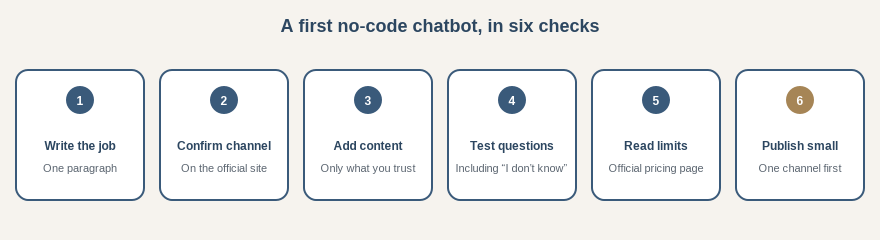
1. Write down the job, not the brand
Before you open a builder, write one paragraph: who will talk to the bot, on which channel (your website, WhatsApp, Instagram, email, or a phone line), and what a successful conversation looks like (an answered FAQ, a booked meeting, a qualified lead, or a handoff to a person). If you cannot describe the job, no editor will fix that for you. Stay narrow for the first version.
2. Choose a tool that officially supports that job
Use the no-code category in this directory as a shortlist, then read the official website for each candidate. Check, on the vendor’s site, whether the channel you need is actually listed, whether a free plan or trial exists, and whether human handoff is described. Examples of tools whose official sites describe no-code or visual building include Voiceflow, Botpress, Manychat, Landbot, Chatbase, Tidio, CustomGPT.ai, Microsoft Copilot Studio and Rasa’s visual builder. Those names are not a ranking. Features and prices change, and we have not tested the builders ourselves.
3. Add only content you can stand behind
Most official product pages describe a knowledge base, uploaded files, or a website crawl. Only add content that is accurate and that you have the right to use. Write short, current answers for the questions you actually receive. If the tool can take actions (refunds, bookings, account changes), read the vendor’s official description of permissions and handoff before you turn those actions on.
4. Test conversations yourself, then decide how it should fail
Official sites often describe a preview or test mode. Use it. Try the questions a real customer would ask, including ones the bot should not answer. Decide in advance what should happen when the bot is unsure: say it does not know, collect a contact, or hand off to a person. This directory’s listings leave testing notes empty until someone here has done a hands-on test — you still need to test your own bot.
5. Read the plan limits before you publish
No-code does not always mean free, and “free” plans often have conversation, contact or feature limits. The listings quote only prices and limits that were clearly published on official sites on 18 November 2026. Re-check the official pricing page before you launch, especially if you work in the EU, because some vendors say prices vary by billing country.
6. Publish a first version, then watch real chats
Put the bot on one channel first. Read transcripts, if the vendor provides them. Change the wording when people get stuck. If you later need engineers, APIs or a self-managed platform, that is a later step — not a requirement for a first FAQ or lead-qualification bot.
Further reading on this site
Use the comparison pages for side-by-side official facts, and open each listing for pricing sources, alternatives and a FAQ. The How we review page explains why this directory does not invent scores or claim hands-on tests it has not done.
Frequently asked questions
Which tools officially describe no-code building?
On official pages checked for this directory, that group includes Voiceflow, Botpress, Manychat, Landbot, Chatbase, Tidio, CustomGPT.ai, Microsoft Copilot Studio (described as no-code) and Rasa’s visual builder. That is not a ranking, and it is not a hands-on test of ease of use.
Can I do this for free?
Some vendors officially describe a free plan or a short trial. Limits differ, and “free” does not always include AI chats or every channel. Read the official pricing page for the tool you pick.
When should I use a human handoff?
Decide this before you publish. Official pages for several tools describe handing a chat to a person. If the bot is unsure, a handoff or a “we will get back to you” message is safer than a guess.